ColorAnt
Optimaliseer de gegevens van kleurmetingen
ColorAnt is een totaaloplossing voor de meting, analyse en verwerking van het kleurbeheer, voor de optimalisatie van de aanmaak van ICC-kleurprofielen.
Foute instrumentaflezingen, drukfouten of andere elementen (zoals niet-homogene gegevens) kunnen de kwaliteit van meetgegevens aantasten. ColorAnt is een zelfstandige software voor de meting, analyse en correctie van kleurengegevens vóór de ICC-profilering. Door zowel de meting als de analyse van meervoudige gegevensreeksen te optimaliseren maakt hij de aanmaak van printerprofielen mogelijk zonder het tijdrovende en dure afdrukken van grote testkaarten. De oplossing omvat een uitgebreide toolbox voor analyse, vergelijking, rapportage en weergave om de gebruikers te helpen met het opsporen van potentiële foutenbronnen en hun de beste tools voor hun correctie aan te bevelen. ColorAnt optimaliseert alle ICC-compliante en andere tools voor printerprofilering op de markt. De oplossing wordt wereldwijd geprezen om haar accurate analyse, en internationaal toegepast om een snellere profielcreatie te verzekeren.
Ze geeft de gebruiker de mogelijkheid om de nodige correcties in de meetgegevens op te nemen. Het resultaat kan vóór de profielberekening worden gecontroleerd. ColorAnt bestaat in twee versies: ColorAnt M is ontworpen voor standaarddrukprocessen en ‑kleurruimten, terwijl ColorAnt L op de verpakkings- en de meerkleurenmarkt mikt. De toolset is compliant met alle standaardformaten voor meetgegevens (ook voor export) en past dus in vrijwel elke werkomgeving.
| Kenmerken | ColorAnt M | ColorAnt L |
| Ondersteuning van kleurruimte | ||
| Grijstint | x | x |
| RGB | x | x |
| CMY | x | x |
| CMYK | x | x |
| Multicolor | x | x |
| Ondersteuning van dichtheid | x | x |
| Colorimetrische & spectrumgegevens | x | x |
| Tools | ||
| Automatische optimalisatie | x | x |
| Correctie | x | x |
| Verwijderen van redundanties | x | x |
| Vloeiend maken | x | x |
| Herschalen | x | x |
| Correctie van optische brightener | x | x |
| Aanpassing tintwaarde | x | x |
| Witcorrectie | x | x |
| Gemiddelden berekenen | x | x |
| Samenvoegen van kleurkaarten | x | x |
| ICC-transformatie | x | x |
| Aanmaken van PDF-rapporten | x | x |
| Aanmaken van XML-rapporten | x | x |
| Weergeven & vergelijken | x | x |
| CIE-conversie | x | x |
| Aanmaken & exporteren van aangepaste kleurkaarten voor RGB, Grijstint & CMYK | x | x |
| Aanmaken & exporteren van aangepaste kleurkaarten voor Multicolor | x | |
| Primaire kleuren bewerken voor CMYK | x | x |
| Primaire kleuren bewerken voor Multicolor | ||
| Inbegrepen in CoPrA | Inbegrepen in CoPrA | |
| M & hoger | XXL of Multicolor Add On |
ColorAnt wordt beschouwd als de totaaloplossing voor go-to-market, die met diverse geavanceerde tools voor kleurbeheer het volledigste overzicht van de kwaliteit van de gemeten printers geeft.
ColorAnt wordt geleverd door ColorLogic, naast CoPrA, de oplossing voor kleurprofilering, en ZePrA, de intelligente kleurenserver.
- Zelfstandige software
- Compliant met meerdere leveranciers
- Compliant met Mac OSX en Windows
- Kortere voorbereidingstijden
- Consistent hogere kleurkwaliteit
- Compliant met alle standaardformaten voor meetgegevens
- Gegevensexport in een waaier van formaten
- Kleurgetrouwheid verzekerd
- Gegevensanalyse en -rapportage
- Aanmaak van kaarten
- Meting van testkaarten
- Bewerking van primaries
- Correctie van optische witmakers
- Meerkleurenopties
Benefits
- Controle van meetgegevens
ColorAnt detecteert inconsistenties in de gegevens vóór het kleurprofiel wordt aangemaakt. - Toepassing van correcties
De gebruikers kunnen correcties, zoals het aftoppen van metingen of de compensatie van optische witmakers, op de meetgegevens toepassen. - Hulp bij de kleurprofilering
De meetgegevens en correcties die ColorAnt levert, dragen bij tot een onmiddellijk betere ICC-kleurprofilering, zodat geen kostbare tijd verloren gaat met de analyse en aanmaak van profielen.
All-in-one solution ColorAnt integrates advanced color management tools to deliver the most comprehensive overview of the measured printers’ quality prior to ICC color profile creation. This ColorLogic supplied solution comes in two variations: ColorAnt M (standard printing processes and color spaces) and ColorAnt L (packaging and multicolor market).

Meet de juiste gegevens
Je kan natuurlijk meten, maar als je de verkeerde gegevens meet, krijg je verkeerde resultaten. Detectiefouten van het instrument, drukfouten of andere elementen kunnen de kwaliteit van meetgegevens aantasten. ColorAnt detecteert en corrigeert inconsistenties in de gegevens vóór het kleurprofiel wordt aangemaakt.

Toepassing van correcties
Niet enkel detecteren, maar ook corrigeren! Met ColorAnt kunnen de gebruikers correcties, zoals het aftoppen van metingen of de compensatie van optische witmakers, toepassen op de meetgegevens om de kleurgegevens te optimaliseren.

Hulp bij de kleurprofilering
De meetgegevens en correcties die ColorAnt levert, dragen van meet af aan bij tot een betere ICC-kleurprofilering, zodat je geen kostbare tijd verliest met de analyse en aanmaak van profielen.
Talk to our sales team about this product.
Praat met onsContact us to get started.
Praat met onsVersion history
Showing the 5 most recent of 28 releases.
7.0.2.
Bug Fixes and Improvements in ColorAnt 7.0.2
- Custom Chart: RGB linearization crashes with index error (Ticket 212468)
- Export Chart: Calculation of the amount of pages went wrong when there were a lot of pages (Ticket 212473)
- Export Chart: The Always Use Full Chart Width option did not work correctly
- Export Chart: Optimized margins for Konica Minolta FD-9 and MYIRO-9 charts
- Export Chart: When an edited preset was saved, the preset was no longer selected in the drop-down menu
- Export Chart: Revised creation of Barbieri LFP charts with autopositioning lines
- Measure: An error while loading the Barbieri device DLL was fixed
- Measure: Optimized Gap input for the Barbieri LFP
- Color Editor: Optimized layout for the Spot Color Report
- Proof Evaluation: Some layout changes to make the UI and Report more uniform
- General UI: Added support for Dark Mode on MacOS systems
- General UI: Some font optimizations
- Installer: The installer is now notarized to guarantee an warning free installation on newer macOS versions
8
What’s new in ColorAnt 8?
- New InkSplitting mode and new light colors available in the Custom Chart tool
- New Find function in the View measurement data dialog
- New markers and margins in the Export Chart tool
- New PSD evaluation methods in the Proof Evaluation tool
- Measure Tool and ColorAnt can now be used simultaneously
- Support for X-Rite i1iSis 2/XL
- New Remeasure message
- The C++ redistributables have been added to the Windows installer
- New license terms
New InkSplitting mode and new light colors available in the Custom Chart tool
A good transition between light and dark inks is a prerequisite for even and smooth gradations. This can be achieved by splitting the logical channels (e.g.CMYK) into the real ink channels used by the printer (e.g. CcMmYK). As a result, lighter colors are used for lighter areas and darker colors are used for darker areas in images/graphics.
For this purpose, a new Mode - Linearization and InkSplitting - has been introduced in ColorAnt 8 and light colors are now available for selection in the channel list.
In contrast to the Linearization mode which creates color ramps for each ink channel, the new Linearization and InkSplitting mode creates ramps for each channel and two color overprints for all channel combinations.
This adds more patches to linearization charts and is intended for creating ink splitting DeviceLink profiles. For example, if a light Cyan ink and a Cyan channel or Gray and Black inks are combined in one channel, the light ink will be used for the highlights and the regular/darker ink for the darker areas.
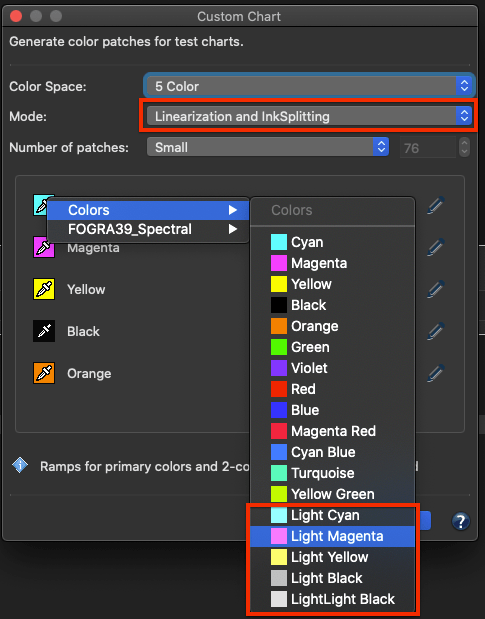
More predefined Colors, including light colors, are now available for selection using the Eyedropper icon. The color selected here is only used for the preview and for channel naming and is not mandatory for the InkSplitting DeviceLink itself.
Note: Currently, InkSplitting DeviceLink profiles cannot be created with CoPrA, but this will be implemented in near future. However, InkSplitting DeviceLinks can be created with the CrossXColor SDK.
Furthermore, the TAC/Ink limit of the custom chart can now be set to more than 400% or as low as 200. By default, the value is set to 400%, but higher values can be enabled after clicking the Lock icon. Since the upper limit is 100% per channel, the TAC depends on the number of channels in the data, e.g. 7 channels result in a TAC limit of 700%. For CMYK and 3 Color (and higher) the TAC/Ink limit is now also available and you can either set the limit as high as the channels allow or as low as 200.
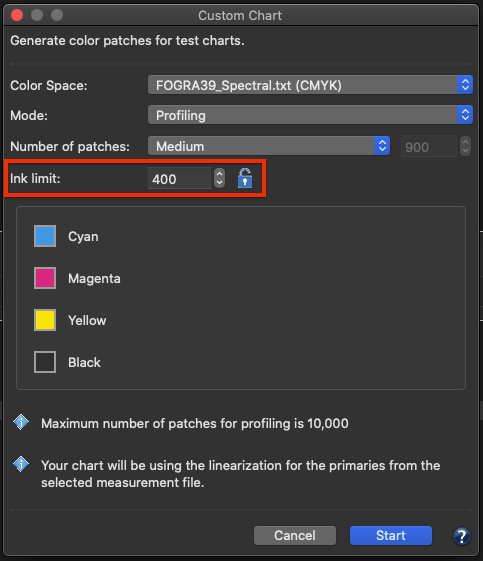
Also, the default order for a 7C chart has been changed to CMYKOGV.
New Find function in the View measurement data dialog
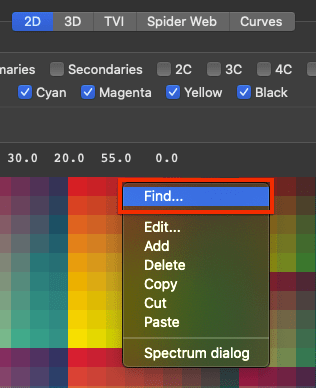
A new Find function has been added to the View dialog. You can now search for IDs, names, CIE data and DCS data.
When searching for Color values, please note that all exact matches are marked, and - if there is no exact match - all closest patches with the same distance will be marked. If you want to search for data in a specific color space (e.g. XYZ, Lab, CMYK) just append the name to the data, e.g. '50 0 0 Lab' or '10 20 30 40 CMYK'. For spectral data, 3 values are interpreted as Lab data. If the number of values matches, the displayed color type is used, e.g. if the data is Lab, you can just enter '50 0 0'. In case of redundancies, multiple patches can be marked, and if no exact match is found, the closest one is marked.
New markers and margins in the Export Chart tool
A new feature to Add Auto Positioning Markers has been implemented for the Barbieri LFP and X-Rite ISIS measuring devices. This function automatically adds the required markers to the chart that are needed by the instruments to perform automatic measurements.
Additionally, a whole new section has been added where user-defined margins for test charts can be defined. This is important for measurement devices that require an additional
“white-space” before and after lines to be measured.
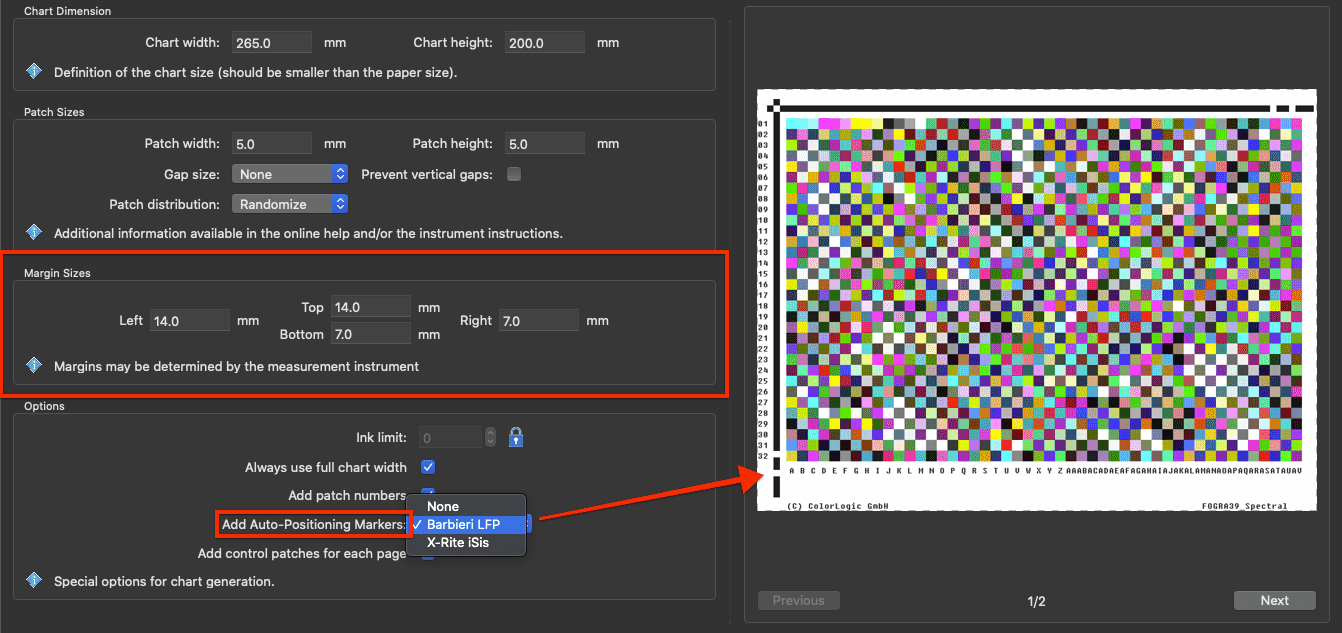
And just like in the Custom Chart tool, the TAC/Ink limit can now be set to more than 400% or as low as 200. Again, the value is set to 400% by default, but higher values can be enabled after clicking the Lock icon. Since the upper limit is 100% per channel, the TAC depends on the number of channels in the data, e.g. 7 channels result in a TAC limit of 700%. For CMYK and 3 Color (and higher) the TAC/Ink limit is now also available and you can either set the limit as high as the channels allow or as low as 200.
New PSD evaluation methods in the Proof Evaluation tool
The PSD (ProcessStandard Digital) is Fogra's answer to the ever increasing need for process stability in digital printing. Two new PSD evaluation methods have been added to the Proof Evaluation tool.
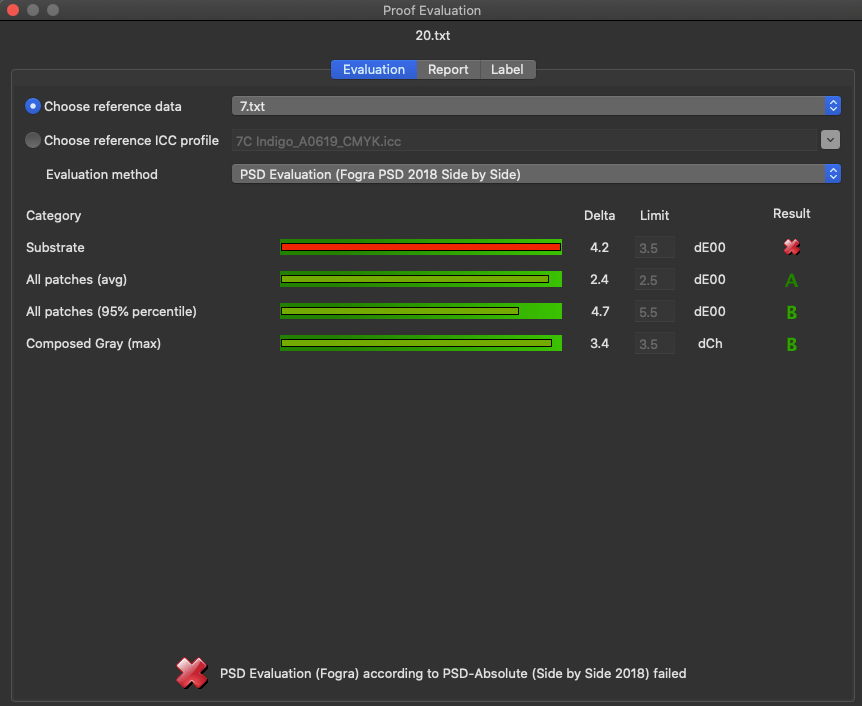
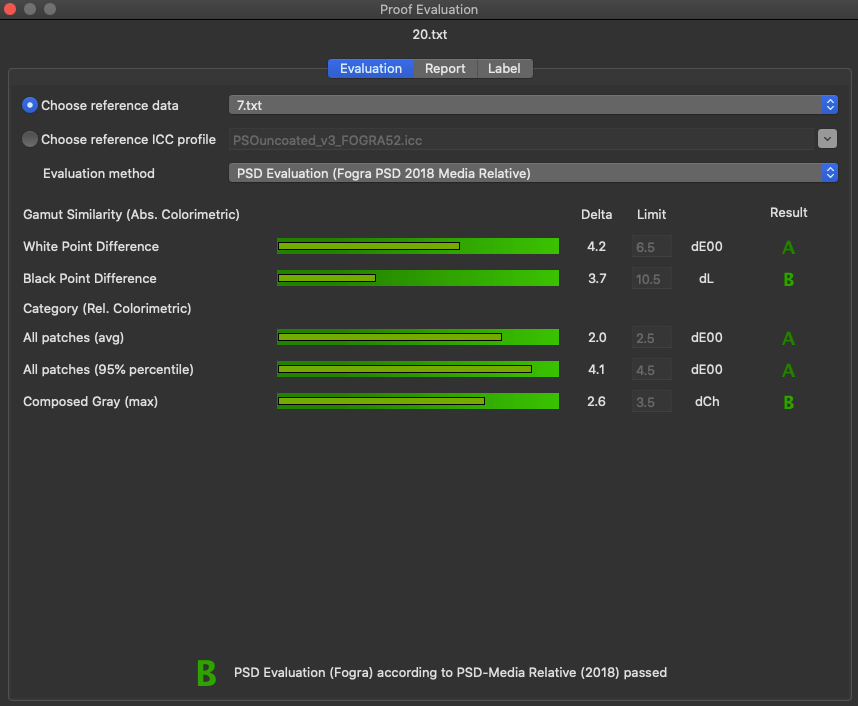
The Result is reported in several quality grades. Grades A-C indicate that all values are within the tolerances and the evaluation has been passed (shown in shades of green). However, if a value exceeds the tolerance limit, a red X indicates that the evaluation has failed.
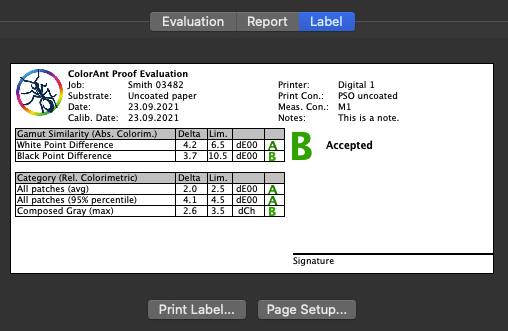
In addition to the improved Report function, you can now print your own label directly from within ColorAnt. The new Label tab shows a preview of the label to be printed. The label contains the data entered in the Report tab, and a table below shows the data from the Evaluation tab. The label also indicates if the print is Accepted or if the evaluation has failed(X) and provides space for a signature.
Support for heterogeneous CxF files
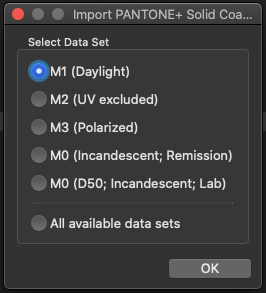
When opening a CxF file that contains multiple measurement conditions, a prompt automatically appears inquiring which of the contained measurement conditions is to be opened.
Measure Tool
Measure tool and ColorAnt can now be used simultaneously
The Measure Tool now runs in its own thread and no longer prevents ColorAnt from being used in parallel.
Support for X-Rite i1iSis 2/XL
Added support for the X-Rite i1iSis 2/XL stripe reader.
New Remeasure message
When measurement data is found in the loaded data, the user has the option to either use this data for remeasurement or to delete the measurement data and use the reference data for a new measurement.
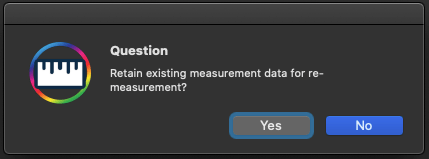
The C++ redistributables have been added to the Windows installer
Some measurement devices require the Microsoft C++ Redistributables, which must therefore be present on the system. However, on a freshly installed system, these are missing which can cause problems in the Measure Tool (missing devices). Therefore, the Microsoft C++ Redistributables are now included in the Measure Tool installer and are automatically installed at the end of the installation process to ensure that all measurement devices work properly on fresh systems.
New license terms
The terms for unlicensed ColorAnt versions have changed. The Compare and View features are no longer available without a license, and neither is the saving of user data.
A demo license now creates encrypted files only, which can only be used by ColorLogic
products. With a demo license all functions are available, except CXF-X4 Export, Evaluation
and saving in other formats than “txtdemo”.
With an "M" license, all functions and tools are available for data with up to four channels (Multicolor tools are disabled), except for dedicated "L" features/tools, which are only available with an “L” license.
8.0.1
Bug Fixes and Improvements in ColorAnt 8.0.1
- Measure: The Konica Minolta FD-9 can now be used on Apple M1 chip systems (Ticket: 222969)
- Correction: At first startup, the “Optimize overprinting” setting is not enabled as it is not recommended
- White/Black Correction: On the first start, the recommended default method “ColorLogic Default” is now set
- ColorEditor: All colors of the same name (inside one CxF file) are now shown (Ticket: 222923)
- ColorEditor: Colors that are out of the tolerance are now marked red in the Spot Color Report (Ticket: 212878)
- Custom Chart: For ColorAnt M licenses – which are limited to four channels -, the CxF Wedge mode is now limited to 3 channels. This is to prevent the creation of five-channel files, which are not supported with an M license.
The reason behind this is that the CxF Wedge function of the Custom Chart tool always creates an additional black channel, so when using three inks the resulting chart does not exceed the maximum number of supported channels.
8.0.2
Update Check: We fixed a bug where ColorAnt crashed on startup during the auto update check (Ticket: 223012/223022). This will no longer happen in newer versions but can still happen in older versions. The workaround for affected versions is to deactivate the AutoUpdate without starting ColorAnt:
- Navigate to the ColorAnt preferences located in:
C:\Users\USERNAME\AppData\Roaming\ColorLogic\ColorAnt\ColorAnt.prefs (on Windows)
or
MacOS\Users\USERNAME\Library\Preferences\ColorLogic\ColorAnt\ColorAnt.prefs (on macOS) - Open the ColorAnt.prefs in a Text editor
- Set the line “UpdateIntervalEnabled = “ to “0”
- Save the file and start ColorAnt
This will deactivate the Automatic Update Checker and the program should start normally.
Export Chart: Fixed an error where the autopositioning markers for the Barbieri LFP were not generated correctly for single-page charts
8.0.2
Bug Fixes in ColorAnt 8.0.3
- Import: A problem was fixed where the import of CGATS files with two measurement data sets did not work
- CxF Export: The problem was fixed that CxF files were no longer exported correctly
- Measure: Fixed a recognition problem of the X-Rite eXact XP (Ticket: 222989)
- Measure: When using the ZePrA ruler, lines were sometimes measured in the wrong direction (Ticket: 223039)
- Measure: A Measure Tool crash that occurred when a connected i1Pro3 was unplugged is now prevented
- Measure: SDK update for the MYIRO-1 fixes a bug where USB connection is not possible in an Intel CPU environment under macOS 12.x
- Report: The DeltaE under Evaluate and in the Report showed different dE methods (Ticket: 223016)
- Patches from Image: The link to the Online Help has been corrected